

Introduction
If you are planning to grow your business while traveling, it offers incredible freedom. Still, it also comes with online security risks that many women worldwide don’t consider until something goes wrong. Whether you’re replying to client emails from a café in Lisbon, joining a Zoom meeting from a coworking space in Bali. You often rely on public Wi-Fi networks that may not be secure.
The reason for choosing the best VPN for digital nomads is more than just a tech upgrade in your borderless career. It’s essential to build safer habits from anywhere to protect yourself. A reliable VPN for remote workers encrypts your internet connection, protects your privacy on public Wi-Fi, and efficiently helps you securely access online banking, company resources, and websites while traveling between countries.
For digital nomads, freelancers, entrepreneurs, and other remote workers, protecting work and personal information is key to traveling safely. In this guide, you’ll learn what a VPN does, which features to look for, and how to compare VPN services for remote work, public Wi-Fi, and travel.
Last Updated: September 2026
NomadShe Quick Picks
Short on time? Here are our top VPN recommendations before you explore the full guide.
Excellent balance of security, speed, usability, and value.
Affordable protection with unlimited simultaneous device connections.
Simple apps and dependable performance for frequent international travel.
Privacy-focused service with a free plan available.
Do Digital Nomads Really Need a VPN?
If you work only from home on a trusted internet connection, you may not often think about using a VPN. Digital nomads work in different settings: a hotel lobby one day, a café the next, and a coworking space after that. Each network is managed differently, and you may not know how it is configured.
Almost all websites and services already use HTTPS encryption, which helps protect information sent between your device and the website. A good VPN adds another layer of protection by encrypting the connection between your device and the VPN server. This can limit what the local Wi-Fi network can see, but keep in mind it doesn’t make you completely anonymous or protect you from every online threat.
A VPN may be useful when you:
✦ Connect to hotel, airport, café, or coworking Wi-Fi
✦ Want to reduce what the local network can see about your connection
✦ Need to connect to a company network that requires a VPN
✦ Want to use a server in another country while traveling, where the service permits it
Some banking, work, and streaming services may block VPN connections or ask you to verify your identity. A VPN also cannot protect you from phishing, malware, weak passwords, or unsafe websites, so keep your devices updated and use multi-factor authentication where available. For remote workers, a VPN can be a helpful part of a broader security routine. Whether you need one depends on your work requirements, the networks you use, and the services you access.
How Does a VPN Work?
A VPN can provide extra protection while you use the internet. When you turn on a VPN, your device first establishes an encrypted link with the VPN service. Your online requests then pass through that service before reaching their destination, making it harder for people on the same Wi-Fi network to read your connection data.
Think of it as putting your internet connection inside a locked envelope for part of its journey. The VPN can make it harder for someone managing the Wi-Fi network to see the contents of your traffic, but it doesn’t make you anonymous or protect you from every online threat. The VPN provider can also see some connection information, so choose a provider you trust.
A VPN also changes the IP address. Websites can generally see the VPN server’s IP address rather than your usual one. This can make your apparent location different, but websites can still identify or track you in other ways. They can do this through your account, cookies, or device settings. But a VPN is always safe to use.
A VPN is only one part of online security. Keep your devices updated, always use strong, unique passwords, and enable multi-factor authentication. You can also follow the NIST Cybersecurity Framework for broader cybersecurity guidance.
Public Wi-Fi Risks Travelers Should Know About
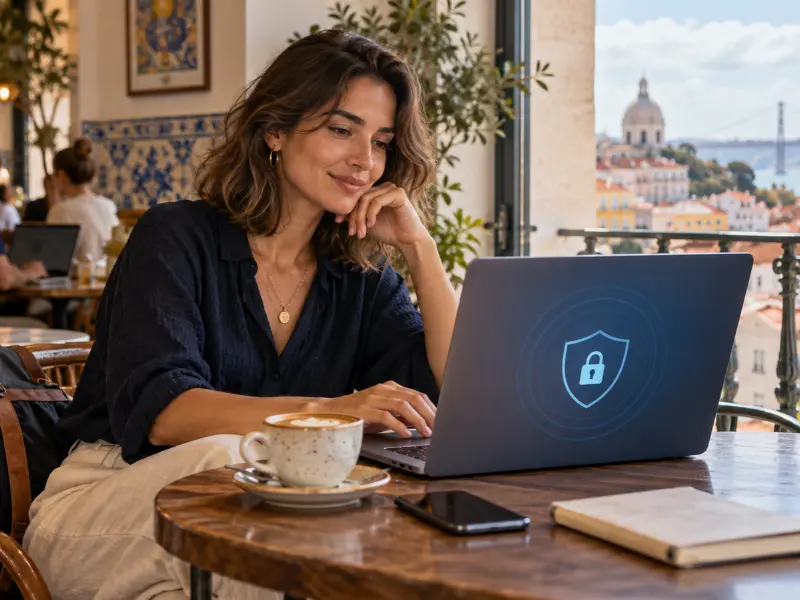
One of the biggest advantages of the digital nomad lifestyle is working from almost anywhere.. Working from cafés, airports, hotels, coworking spaces, and libraries makes it easy to stay productive while traveling. These places often provide shared Wi-Fi, though, and you may not know who manages the network or how it is configured.
Almost all websites use HTTPS to encrypt information between your browser and the site. Still, be careful when joining unfamiliar hotspots. Fake networks can imitate legitimate ones, and careless use of shared networks may expose you to avoidable risks. Before connecting to any public WiFi, confirm the network name with staff, and avoid sensitive tasks on public Wi-Fi when you can. For practical advice on using public hotspots, read the FTC’s public Wi-Fi safety guidance
For example, you might be finishing a client project in a café and need to upload files or check a payment. A VPN can encrypt traffic between your device and the VPN server. Still, it doesn’t guarantee safety. Use HTTPS websites, keep your device updated, and consider mobile data for banking or other sensitive activity.
A VPN may be useful when you’re:
✦ Working from cafés, restaurants, or libraries
✦ Using hotel, hostel, or airport Wi-Fi
✦ Connecting at a coworking space with a shared network
✦ Accessing company tools that require a VPN
✦ Uploading client files while traveling
A VPN can help protect your connection on networks you don’t control. But it will not prevent phishing, malware, or unsafe websites. Use it alongside good security habits, and check your employer’s rules before connecting to work systems.
What to Look for in a VPN When You Work and Travel
VPNs differ in their privacy policies, features, server coverage, and ease of use. Choose one that suits the way you work and travel, and check its current features before subscribing.
✦ Strong Encryption and Secure Protocols
Look for a VPN that uses modern encryption and well-supported protocols. These help protect the connection between your device and the VPN server, including when you’re using shared Wi-Fi. A VPN doesn’t protect against every online threat, so keep your devices and apps updated, too
✦ A Clear, Independently Reviewed Privacy Policy
Check what information the provider collects, how long it keeps it, and whether it shares data with others. A “no-logs” claim is more meaningful when independent reviewers have assessed the provider’s systems or policy. An audit is useful evidence for new nomads, but it doesn’t guarantee privacy.
✦ Kill Switch
A kill switch can block internet traffic if the VPN connection drops, helping prevent your device from switching back to an unprotected connection. Check whether the feature is available on your devices and whether you need to turn it on in the app’s settings.
✦ Reliable Speeds
Video calls, cloud tools, and file uploads need a stable connection. A VPN may reduce speed, and performance varies by provider, server, distance, and network. Always look for recent independent speed tests, and use a trial or refund period to see how it works with your usual tasks.
✦ Useful Server Locations
While traveling, these can help you find a nearby server. Connecting through another country may change the location of websites. But it doesn’t guarantee access to banking, work, or streaming services; those providers may restrict VPN connections.
✦ Support for Your Devices
Check that the VPN works with the devices you use, such as your laptop and phone. Compare the number of simultaneous connections included in the plan, especially if you want to use the VPN on several devices at once.
✦ Simple Apps and Helpful Support
Choose an app that makes it easy to connect, change servers, and find important settings. If you travel across time zones, check support hours and contact options in case you need help.
✦ Price and Subscription Terms
Compare the renewal price, device limits, refund terms, and included features, not just the introductory offer. A lower price may suit your budget, but make sure the provider’s privacy practices and features meet your needs. Before choosing a provider, review its terms and privacy policy to understand what information the VPN app may collect or share.
Quick Comparison of VPNs for Digital Nomads
Compare key features and choose an option that fits your remote-work needs.
| VPN | Best For | Device Connections | Free Plan | Key Advantage | NomadShe Summary |
|---|---|---|---|---|---|
| NordVPN Best Overall | Remote employees and everyday digital nomads | Up to 10 | No | A broad mix of security features, speed, and ease of use | A versatile paid option |
| Surfshark Best Value | Budget-conscious travelers with several devices | Unlimited | No | Unlimited simultaneous device connections | Useful for connecting many devices |
| ExpressVPN Frequent Travel | Frequent international travelers | Up to 14* | No | Straightforward apps and servers in many countries | A convenience-focused option |
| Proton VPN Free Plan Available | Privacy-conscious remote workers | Free: 1; paid: up to 10 | Yes | Free plan with no data limit | A free option for one device |
| CyberGhost Beginner-Friendly | New VPN users and casual travelers | Up to 7 | No | Apps designed to be straightforward to use | An approachable option for beginners |
| Private Internet Access Customizable | Users who want more control over settings | Unlimited | No | Flexible settings and broad server coverage | An option for users who like customization |
| Mullvad VPN Privacy-Focused | Travelers who prioritize account privacy | Up to 5 | No | You can create an account without an email address | A distinct account-registration approach |
Note: Features and connection limits can vary by plan and may change. Check each provider’s current plan details before subscribing. *ExpressVPN’s connection limit depends on the plan.
Best VPNs for Digital Nomads
Choosing the best VPN for digital nomads depends on where you travel and which devices you use. And whether you need a VPN for remote work or mainly for everyday browsing. A VPN can encrypt traffic on shared networks, but it cannot guarantee access to banking or work services, and it doesn’t replace other security habits. Below are seven providers to compare for remote work and travel. Check each provider’s current terms and features before subscribing.
✦ NordVPN – Best Overall
NordVPN is a well known option for digital nomads who want a mix of security features, server locations, and easy to use apps. It may suit freelancers, remote employees, and frequent travelers, though performance can vary depending on your connection and the server you choose.
Best For: Remote workers looking for a VPN for everyday use across several devices.
Why Consider It:
✦ Apps for major devices and operating systems
✦ A large network of server locations
✦ A no-logs policy that has been independently reviewed
✦ Security features such as a kill switch
Potential Drawbacks:
✦ Monthly plans may cost more than longer subscriptions.
✦ Review the renewal price and plan terms before buying.
✦ Surfshark – Best for Multiple Devices
Surfshark lets you connect unlimited devices under one subscription, which may appeal to travelers who carry a laptop, phone, and tablet. Before subscribing, compare its plans carefully, as some features depend on the tier you choose.
Best For: Budget-conscious travelers and remote workers with several devices.
Why Consider It
✦ Unlimited simultaneous connections
✦ Apps for common devices
✦ Security and privacy features across its plans
✦ Long-term plans may cost less per month than monthly billing
Potential Drawbacks
✦ Some features are limited to higher-tier plans.
✦ Introductory and renewal prices may differ.
✦ ExpressVPN – Best for Frequent Travel
ExpressVPN offers apps for a range of devices and server locations in many countries. It may suit travelers who prefer a straightforward app, but speed and availability depend on your network, location, and chosen server.
Best For: Frequent international travelers who value simple apps.
Why Consider It
✦ Apps for major platforms
✦ Servers in many countries
✦ Simple setup and connection process
✦ Paid plans offer different device limits
Potential Drawbacks
✦ It may cost more than some competitors.
✦ Check the device limit and price for the specific plan you select.
✦ Proton VPN – Best Free Plan Option
Proton VPN has both free and paid plans. The free plan is a good starting point for basic VPN use, but it offers fewer server choices and supports only one connected device at a time. Paid plans add more locations and simultaneous connections.
Best For: Privacy-conscious travelers who want to try a free plan.
Why Consider It
✦ A free plan with no data limit
✦ Paid plans offer more server locations
✦ Privacy-focused service with independently reviewed practices
✦ Apps for common devices
Potential Drawbacks
✦ The free plan supports one device at a time.
✦ Free users have fewer server choices than paid users.

✦ CyberGhost – Beginner-Friendly Option
CyberGhost offers apps designed for straightforward setup and use. It may suit first-time VPN users who want a simple way to connect while traveling. Check its current plan details and whether its features match your needs.
Best For: First-time VPN users and travelers who prefer a simple interface.
Why Consider It
✦ Apps for major platforms
✦ A large selection of server locations
✦ Features for different online activities
✦ Longer subscriptions may have lower monthly rates
Potential Drawbacks
✦ Monthly plans may be more expensive than long-term plans.
✦ Server performance can vary by location and network.
✦ Private Internet Access (PIA) – Best for Customization
Private Internet Access offers settings for users who want more control over how their VPN connection works. If you are new to VPNs, the range of options may take time to understand.
Best For: Experienced users who want to customize VPN settings.
Why Consider It
✦ Customizable connection settings
✦ Apps for major platforms
✦ A broad server network
✦ Plans that may support unlimited device connections
Potential Drawbacks
✦ Some settings may feel complicated for beginners.
✦ Check current plan terms and device limits before subscribing.
✦ Mullvad VPN – Best for Email-Free Sign-Up
Mullvad lets users create an account without providing an email address. Its approach can appeal to privacy-conscious travelers, though its pricing and features differ from providers that offer multiple subscription tiers.
Best For: People who value an account sign-up process that does not require an email address.
Why Consider It
✦ No email address required to create an account
✦ Straightforward monthly pricing
✦ Privacy-focused service
✦ Independently reviewed security practices
Potential Drawbacks
✦ Compare its server locations and features with your travel needs.
✦ Check current device limits and payment options before subscribing.
Free VPN vs Paid VPN
Many people search for a free VPN before paying for a subscription. While free VPNs can be useful in certain situations, they often come with limitations that make them less suitable for full-time remote work. A free VPN can work for occasional browsing, but plans differ in server choice, device limits, speed, and features. Some free plans, such as Proton VPN’s, come from established providers; others may have unclear privacy practices. Check the provider’s data policy before installing any VPN app.
On the other hand, paid VPN plans often offer more server locations, more simultaneous connections, and additional features. It can be useful if you travel frequently or need to connect several devices. But paying a subscription does not automatically guarantee better privacy or security.
Compare the provider’s privacy policy, independent reviews or audits, server options, device limits, and renewal price. Choose the plan that fits your work and travel needs.
Free VPN vs. Paid VPN: What’s the Difference?
Free and paid plans can differ in server choice, device limits, and extra features. Compare the details for the provider and plan you’re considering.
| Feature | Free VPN plan | Paid VPN plan |
|---|---|---|
| Privacy and security | Depends on the provider. Review its privacy policy and security practices. | Also depends on the provider. A subscription alone does not guarantee better privacy. |
| Speed | May vary with the service, server, and network. | May offer more server choices, but performance still varies. |
| Server locations | Often fewer locations or less choice, depending on the plan. | Often more locations to choose from. |
| Data allowance | Some plans set limits; others, such as Proton VPN Free, offer unlimited data. | Check the provider’s plan details; limits vary. |
| Device connections | May allow fewer simultaneous connections. | May allow more connections, depending on the provider and plan. |
| Extra features | Some advanced features may not be included. | May include additional features, depending on the plan. |
| Best suited to | People whose needs fit the plan’s limits and features. | People who need particular locations, features, or more device connections. |
How to Set Up a VPN Before Traveling
If you are a new nomad, set up and test your VPN before you leave, while you still have access to your usual internet connection and account support.
Step 1: Choose a VPN Provider
First, find the best VPN for you. Compare the provider’s privacy policy, security features, available server locations, device limit, and subscription terms. If you’ll need access to work systems, check your employer’s VPN requirements too.
Step 2: Choose a Plan
All plans differ across VPN providers. Compare monthly and longer-term prices, including renewal costs and refund terms. If you haven’t used the service before, check whether it offers a trial or money-back period.
Step 3: Install the App
You must have a working app before you go. Download the VPN app from the provider’s official website or your device’s app store. Install it on the devices you plan to use while traveling.
Step 4: Sign In and Connect
Now you will sign in and connect to a server. If you’re using a VPN for work, follow your employer’s instructions about server locations and approved apps.
Step 5: Review the Settings
Learn the app’s settings. Check whether features such as Auto-Connect or a kill switch are available on your device, and enable them if they suit your needs. Their names and settings can vary between VPN apps.
Step 6: Test Before You Leave
This is a very important point: make sure the app works, and you understand its settings before you go. Disconnect and reconnect, try another server, and make sure websites and work tools you rely on still function. Keep your login details and provider support information in an accessible place. Before your trip, review CISA’s cybersecurity tips for travelers, including its advice on updating devices and connecting to public Wi-Fi.

VPN Mistakes to Avoid While Working and Traveling
Even a reputable VPN is only one part of online security. These habits can help you use it more thoughtfully while traveling.
✦ Browsing Sensitive Services Before Connecting
If you plan to use a VPN on public Wi-Fi, connect before opening work or personal accounts. For sensitive banking tasks, mobile data may be a better option when available. A VPN can add privacy, but a secure VPN for remote work doesn’t guarantee that a bank or work service will accept the connection.
✦ Choosing a Free VPN Without Checking Its Privacy Policy
Free plans vary. Before installing one, check what data the provider collects, whether it shares information, and what limits apply. A free plan from a known provider may suit some needs, but don’t assume every free VPN offers the same privacy protections.
✦ Delaying App Updates
Keep your VPN app and device operating system up to date. Updates may include security fixes and compatibility improvements.
✦ Not Reviewing Connection Settings
Some VPN apps offer Auto-Connect or a kill switch. Check whether these options are available on your device and decide whether to enable them. Features and settings differ by provider.
✦ Reusing Passwords
A VPN doesn’t protect you from reused or easily guessed passwords. Use a unique password for each important account and enable multi-factor authentication where available.
Frequently Asked Questions
Do remote workers need a VPN?
A VPN can be useful for remote workers if you often use shared Wi-Fi or your employer requires one to access company systems. It encrypts the connection between your device and the VPN server, but it doesn’t replace other security practices. For public Wi-Fi, use HTTPS websites and keep your devices updated.
Can I use a VPN to access my bank account abroad?
A secure VPN for remote work can add an extra layer of protection on shared Wi-Fi, but it does not replace other security practices.
Which VPN is suitable for streaming and remote work?
It depends on your needs, location, and the service you want. NordVPN, ExpressVPN, and Surfshark are options to compare, but streaming access and connection speeds can vary. Check the provider’s current plan details before subscribing.
NordVPN vs. ExpressVPN: Which should digital nomads choose?
Compare their current prices, device limits, server locations, and features against your needs. NordVPN and ExpressVPN offer different plans and features, so there isn’t one best choice for every digital nomad.
Does a VPN protect me on public Wi-Fi?
A VPN encrypts traffic between your device and the VPN server, making it harder for someone on the same Wi-Fi network to read it. It doesn’t protect against every threat or make you anonymous.
Will a VPN slow down my internet?
It can. The effect depends on your internet connection, VPN provider, server location, and protocol. Try a nearby server and test the VPN with your usual work tasks, such as video calls or file uploads.
Conclusion
Working remotely from anywhere in the world is one of the greatest advantages of the digital nomad lifestyle, but it also means taking responsibility for your online security. Every time you connect to public Wi-Fi in a café, airport, hotel, or coworking space, your personal information and work data deserve the same level of protection as they would at home.
The best VPN for digital nomads isn’t simply the one with the most features; it must fit your travel style, work requirements, and budget, whether you’re looking for advanced security, affordable pricing, global server coverage, or maximum privacy. A VPN can help you work confidently from almost anywhere.
If you are just getting started, then choose a provider with strong encryption, a verified no-logs policy, fast global servers, and easy-to-use apps. Those features can make the biggest difference to your daily remote work experience.
A VPN should be part of a complete digital security routine, alongside strong passwords. It should also include two-factor authentication, regular software updates, and good online habits. By taking these simple precautions, you’ll be better prepared to work safely, protect your personal information, and enjoy the freedom that comes with the digital nomad lifestyle.
Online security is just one part of building a successful location-independent lifestyle. Explore these practical NomadShe guides to travel smarter, protect your finances, and work confidently from anywhere.
Best Travel Cards
Compare travel-friendly cards with low fees and international benefits.
Best Tools
Discover essential apps and tools to work remotely and stay productive.
Travel Insurance
See whether Auras Travel Insurance is the right choice for your next trip.
Travel Safely
Practical safety tips for women working and traveling around the world.